
Kishi Notch · Claude Code
Claude Code in your notch
Keep working in another app. When Claude Code needs you, the notch asks, and you answer right there.
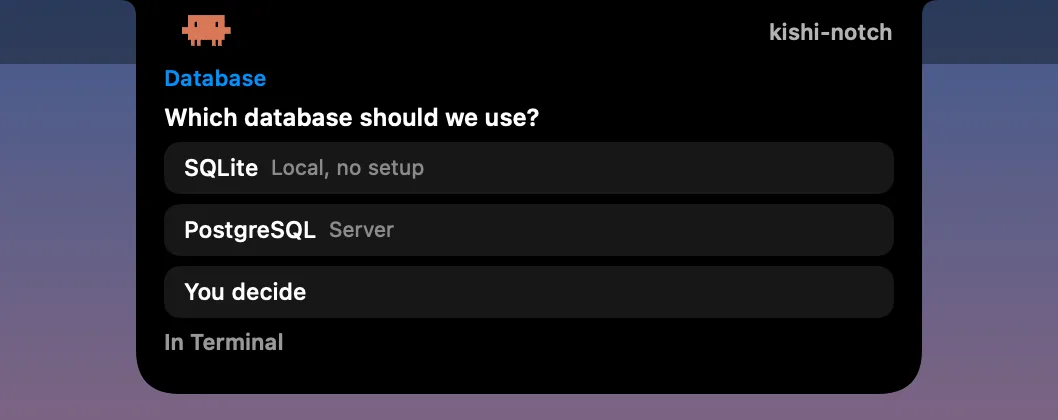
Can I approve Claude Code requests without going back to the terminal? Yes. With Kishi Notch connected, a permission request from Claude Code opens in the MacBook notch with the tool and the command, and Allow or Deny buttons. Multiple-choice questions show their options, and when a task finishes you can read a short summary and send the next message from the notch.
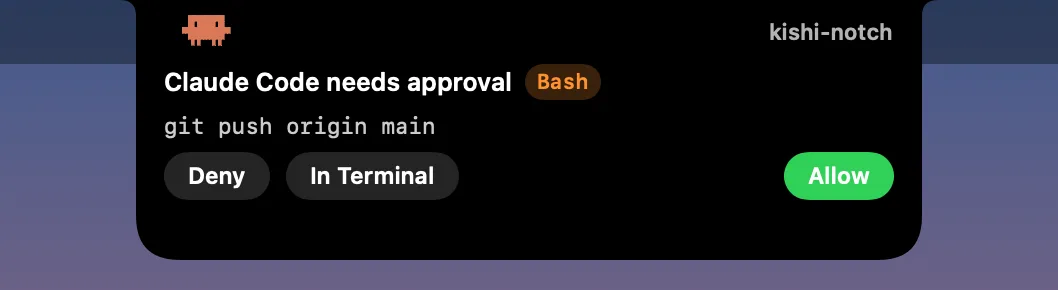
What appears in the notch
- Working: each session shows with its project name and a little pixel Claude typing at its computer.
- Needs approval: the tool and a one-line summary of the command or file, with Allow, Deny and In Terminal (to answer there instead).
- Questions: Claude’s multiple-choice questions with their options, including questions where you can pick more than one.
- Done: the end of Claude’s reply, or an optional two-line summary, and a Reply button to send the next message from the notch.
- Claude’s moods: it waves when a session starts, thinks when your message arrives and facepalms when a command fails; a light bulb goes on when it has a question, it points when it needs your approval, throws confetti when it’s done and falls asleep under a blanket when idle. With music playing, it dances to the song’s genre instead of typing: guitar for rock, hair flying to metal, drums for punk, a baton for classical, halay for Turkish folk…
- Usage: with Claude Code in the terminal, how much of your 5-hour and weekly limits you’ve used, and when they reset, under your sessions.
- Codex: shows when a turn ends.
At work
With music
Pick one to see it. These are the same animations the app plays.
Everything else Kishi Notch does →
How to connect it
- Install Kishi Notch and open Settings → AI Agents.
- Press Connect next to Claude Code (and Codex, if you use it).
- That’s it. Start Claude Code as usual in any terminal or editor.
Connecting adds Kishi Notch’s own hook to ~/.claude/settings.json (and a notify line to ~/.codex/config.toml) and wraps Claude Code’s status line: your own status line still shows, and the usage percentages are read from it. Nothing else in those files changes, and a backup is made the first time. Disconnect puts everything back.
Privacy
Commands, questions and messages are only shown on your Mac; Kishi Notch doesn’t store them or send them anywhere. The hook talks to the app through a private file on your Mac that only your user account can open. The two-line summary is optional: it runs Claude Code’s Haiku model on your own account, so Claude’s last reply goes to Anthropic and counts toward your usage. Turn it off in Settings and Kishi Notch shows the start of Claude’s reply instead. Spotify doesn’t share the song’s genre, so to let Claude dance, the title and artist of the song playing are looked up in Apple’s iTunes search; you can turn this off in Settings too. Details are in the Privacy Policy.
Questions
Do I need anything else?
Claude Code installed on your Mac, and the full version of Kishi Notch. The Mac App Store edition (Lite) can’t write to other apps’ settings, so it doesn’t include this.
Will Claude’s own notifications show twice?
No. While the agents area is on, Kishi Notch doesn’t repeat the Claude app’s notifications in the notch, and can hide its banner too.
Is Kishi Notch made by Anthropic?
No. Kishi Notch is an independent app and isn’t affiliated with or endorsed by Anthropic or OpenAI. Claude and Claude Code are trademarks of Anthropic.
Try it with your next Claude Code session: every feature is free for 7 days.
Download for Mac