
Kishi Notch · Creators
Look at the lens, not your notes
A prompter right under the camera, a mirror with an edge light, and one button to record yourself or your screen. None of it shows up in the video.
Can I read a script on my MacBook while looking at the camera? Yes. Kishi Notch scrolls your script in the notch, directly under the camera, so your eyes stay next to the lens while you read. The island never appears in screen recordings, screenshots or screen sharing, so viewers only see you.
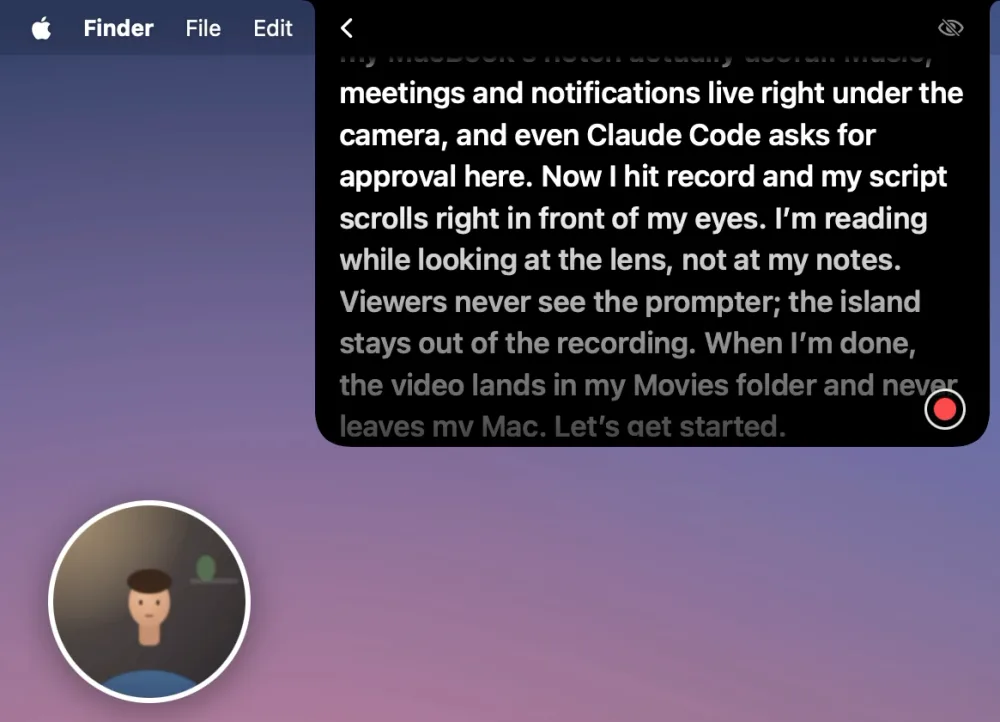
Prompter under the camera
- Type or paste your script straight into the panel; it stays on your Mac for next time.
- It scrolls where you’re looking: the line you’re reading sits just below the lens and the rest fades away.
- Your pace: click to pause, hover for restart and speed, pick the text size.
- A camera preview on your screen as soon as the prompter opens, so you can check yourself before and while you record.
Record yourself or your screen
- Camera: one button counts 3-2-1, records your camera and microphone, and starts the script from the top.
- Screen: records the screen you’re on with your microphone and cursor, with a camera bubble you can drag anywhere and make round, square or wide, like Loom. Its buttons never show up in the recording.
- Camera and microphone: turn either on or off right next to Record with; the small arrow picks another camera or microphone, such as an iPhone or a USB mic.
- Recordings land in Movies → Kishi Notch and never leave your Mac. The prompter and the island stay out of them.
Mirror before you hit record
- Edge light: the edges of your screen glow white and the brightness goes up, lighting your face in a dark room like a ring light. It turns back when you’re done.
- Mic level to check you’re heard, a framing grid, zoom, and mirrored or true view.
- Camera and microphone choice for an iPhone (Continuity Camera), an external webcam or a USB mic, and macOS Video Effects such as Studio Light and Portrait.
Invisible in recordings and calls
Turn on Hide from screen recording and sharing and the whole island stays on your screen but out of screen recordings, screenshots and screen sharing in Zoom, Meet or Teams. While the prompter scrolls, it’s hidden regardless. The edge light never shows up in a recording.
How to start
- Right-click the island (or click with two fingers) to open All Features.
- Press the camera button at the top to open Mirror, then Prompter.
- Type or paste your script, pick Camera or Screen, turn the camera and microphone on or off, and press Start.
- Press the red button in the corner to record: it counts 3-2-1 and starts the script from the top.
Privacy
The camera runs only while Mirror or the prompter is open. Your script and recordings stay on your Mac and aren’t sent anywhere. Recording the screen needs macOS’s Screen Recording permission, asked only the first time you record your screen. Details are in the Privacy Policy.
Questions
Do I need a notch?
No. On a Mac without a notch the island sits at the top centre of the screen.
Which macOS do I need?
macOS 14 or later; recording the screen needs macOS 15 or later.
Is it in Kishi Notch Lite?
No. The prompter, Mirror and recording are in the full version only.
Everything else Kishi Notch does →
Try it on your next video: every feature is free for 7 days.
Download for Mac