
Kishi Notch · Menu bar battery
Battery percentage, time and temperature in your menu bar
Kishi Notch replaces the plain battery icon with one you can shape, and a click away it shows what macOS keeps to itself.
How do I show battery percentage on a Mac? macOS can show the percentage on its own: open System Settings → Control Center → Battery and turn on Show Percentage. For time remaining, temperature, health and power draw, add Kishi Notch. Its menu bar indicator shows the percentage inside or beside the icon, can add time remaining and temperature, and opens a detailed battery panel when you click it.
In the menu bar
- Your shape: filled, classic or ring, with the percentage inside, on the left, on the right or hidden.
- Your style: system, rounded or monospaced font, and the size you like.
- Colors that mean something: green while plugged in, red at 20% and below, yellow in Low Power Mode, and a plug glyph while charging.
- More at a glance: time remaining, battery temperature and power draw right in the menu bar, on one or two lines.
One click for the details
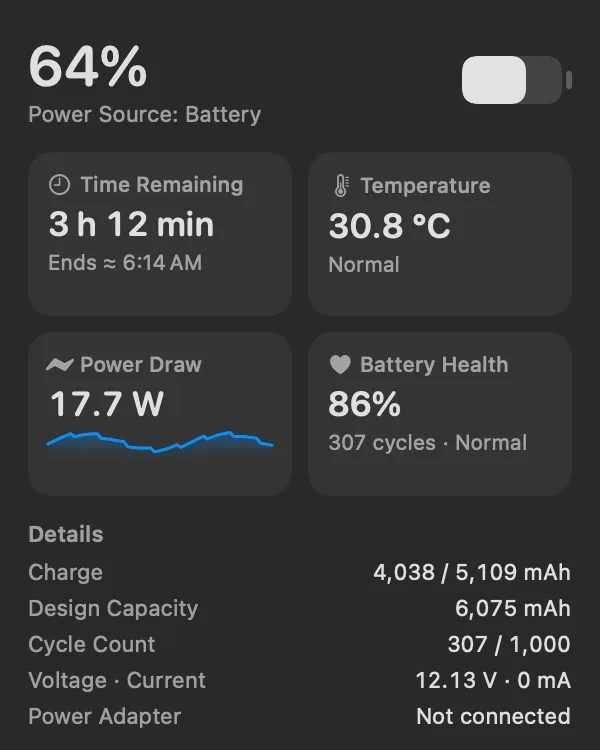
- Time remaining, sooner. If macOS hasn’t estimated yet, the battery controller’s own estimate fills in, with the time it will end or finish charging.
- Temperature and power draw. The battery’s temperature and live watts with a small graph.
- Health you can read. Health, cycle count, charge and design capacity in mAh, voltage, current and adapter wattage.
- What’s using energy. The apps drawing the most power right now, and your charge limit.
Battery moments in the notch
On a MacBook with a notch, the island tells you once when the charger goes in or out, when the battery drops to 20% and 10%, when it’s full and when charging holds at your limit, then gets out of the way. “Service recommended” appears only when macOS itself recommends service.
Questions
Does it work on Macs without a notch?
Yes. The menu bar indicator works on any Mac with macOS 14 or later, Apple Silicon or Intel. The island opens from the top center of the screen on Macs without a notch.
Is battery information sent anywhere?
No. Battery readings stay on your Mac. See the Privacy Policy.
Is it in the Mac App Store edition?
Kishi Notch Lite has the menu bar indicator and the battery menu. The App Store sandbox doesn’t allow reading the battery temperature or other apps’ energy use, so Lite shows the cycle count instead and leaves out the energy list.
Kishi Notch is $19.99 once, with every feature free for 7 days.
Download for Mac